Subscription plans
Overview
any.site offers subscription plans that define usage limits for your company. Your subscription plan determines how many users can access the platform and how many companies you can share your bots with.
View your subscription plan
You can view your current subscription plan and usage at any time.
-
Click on your profile picture in the top right corner.
-
Click View Plan in the dropdown menu.
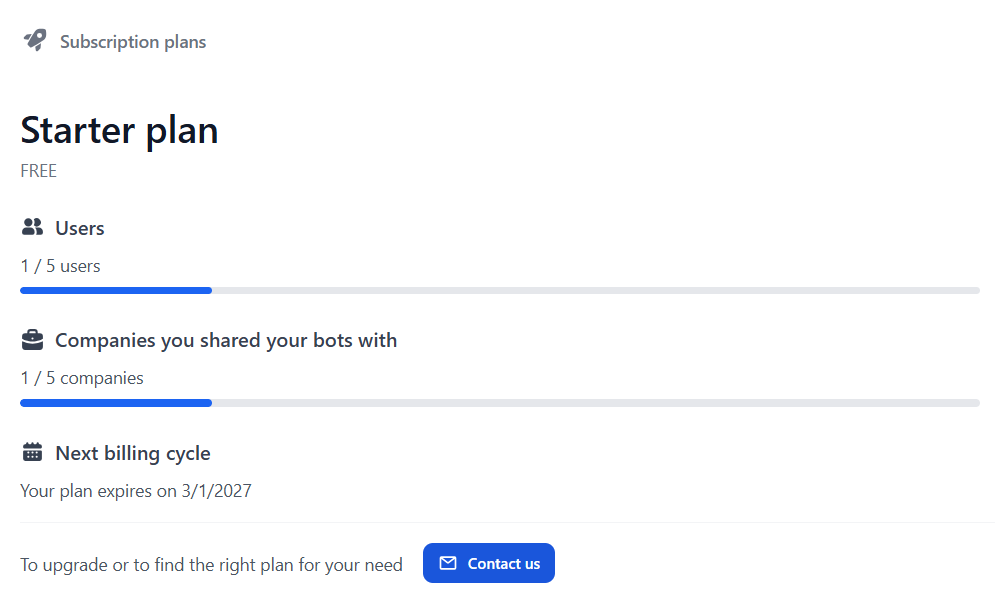
The subscription page displays:
-
Your current plan name and price
-
Number of users (used / limit)
-
Number of companies you shared bots with (used / limit)
-
Next billing cycle date
Understanding usage limits
Your subscription plan includes two main limits:
- Users
-
The maximum number of team members who can log in and use any.site within your company.
- Shared companies
-
The maximum number of external companies you can share your bots with.
Progress bars show your current usage against these limits. The color indicates your usage status:
-
Blue: Within normal limits
-
Orange: Limit reached or exceeded
Usage alerts
any.site notifies you when you approach or exceed your subscription limits through visual alerts.
Banner alerts
When you reach or exceed a limit, a colored banner appears at the top of the page:
-
Blue banner: "You are about to exceed your plan limits"
-
Orange banner: "You have exceeded your plan limits"
The banner includes a link to View subscription plans where you can review your current usage. You can dismiss the banner by clicking the X button on the right side.
Action alerts
When you perform an action that approaches or exceeds a limit (such as adding a new user or sharing a bot with a company), a colored alert box appears on the page:
-
Blue alert: "This is the last [user/company] you can add according to your Starter plan"
-
Orange alert: "You are exceeding your Starter plan with this action. We will contact you soon to suggest a further plan"
Each alert includes a link to View and upgrade your plan where you can see detailed usage information.
What happens when you exceed limits
You can continue using any.site even after exceeding your subscription limits. The platform does not block access or functionality.
When you exceed a limit:
-
You see alerts on relevant pages
-
You can still add users or share bots with companies
-
Our support team will contact you to discuss upgrading your plan
|
Exceeding limits does not immediately restrict your access. We will reach out to help you find the right plan for your needs. |
Upgrade your plan
To upgrade your subscription plan or discuss your usage needs:
-
Navigate to the Subscription plans page.
-
Click Contact us at the bottom of the page.
-
An email will open with our support team’s contact information.
Alternatively, contact support directly at support.anysite@boschrexroth.de.
Current plan: Starter
The Starter plan is currently available with the following limits:
-
5 users: Up to 5 team members can log in and use the platform
-
5 shared companies: You can share your bots with up to 5 external companies
-
FREE: No cost during the trial period
-
Valid until: See your subscription page for the current expiration date
|
These limits apply at the company level. All users within your company share the same subscription limits. |
Frequently asked questions
For subscription-related questions (limits, billing, user counts), see the Admin section of the FAQ.